Nintex Workflow - PowerShell Workflow Status Codes
Some of you may be using the "Set Workflow Status" action in Nintex Workflow, which allows you to create custom workflow statuses (statii?).
I just had a need to find out what status codes sharePoint thinks are available for my workflow, since there seemed to be a mismatch between the status I was setting, and the status that was appearing in the list item.
I created the following script to help me with tracking down this issue.
At this stage, it only handles List workflows, but if anyone has a need for it to handle State workflows also, let me know and i'll tweak it.List Workflow Status Codes
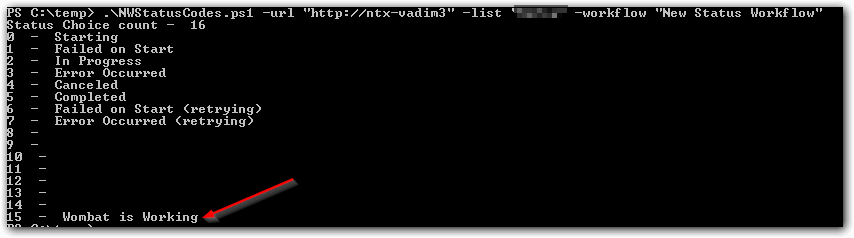
# .\NWStatusCodes.ps1 -url "http://..." -list "listname" -workflow "workflowname"Param( [parameter(Mandatory=$true)] [alias("url")] $siteurl, [parameter(Mandatory=$true)] [alias("list")] $listname, [parameter(Mandatory=$true)] [alias("workflow")] $workflowname)$site = Get-SPSite $siteurl$web = $site.RootWeb;$list = $web.Lists[$listname];$statusChoices = $list.WorkflowAssociations.GetAssociationByName($workflowname,[System.Globalization.CultureInfo]::CurrentCulture).BaseTemplate.GetStatusChoices($web);$countChoices = $statusChoices.count;Write-Host 'Status Choice count - ' $countChoices;$i = 0;while($i -lt $countChoices){ Write-Host $i ' - ' $statusChoices[$i]; $i++;}When I ran the above script on my list and workflow, I received the following :
Downloads
PowerShell Workflow Status Codes: Download PowerShell Script